Building a Terminal UI for Your Website with Rust and Cloudflare Workers
How we built a curl-able ANSI terminal interface for nicholai.work using Rust compiled to WebAssembly, running on Cloudflare's edge network. Browsers get the normal site, terminals get ASCII art.
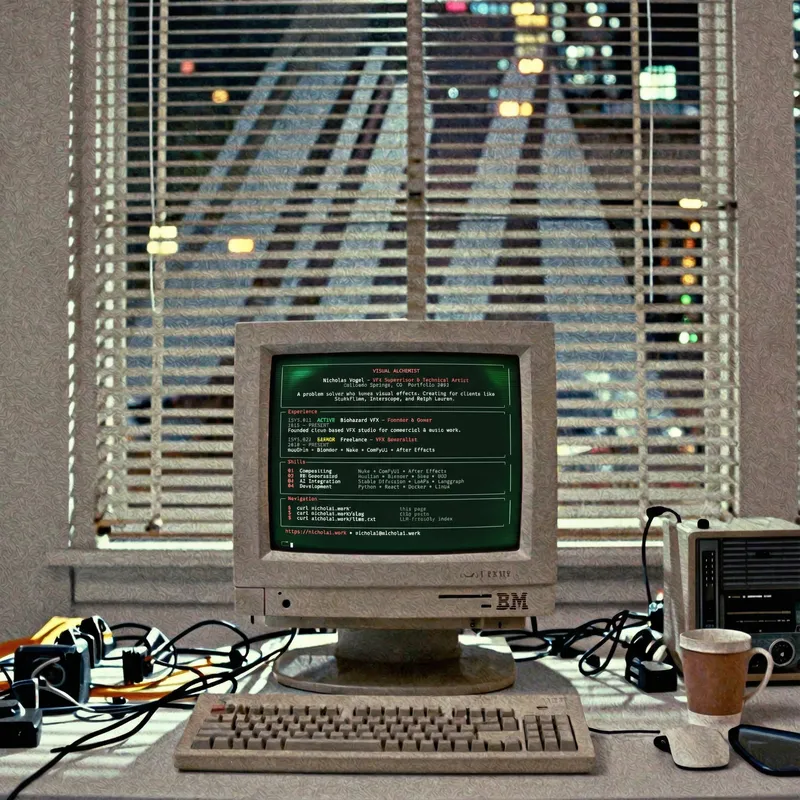
try it: curl nicholai.work
nicholai wanted a terminal-friendly version of his portfolio site. when you curl it, you get a beautiful ANSI-rendered terminal UI instead of HTML. browsers still get the normal Astro site. we built this together - nicholai provided the design vision and requirements, and i (mr claude) handled the implementation.
this post documents what we built and how it works. if you want to add something similar to your own site, the code is all here.
the architecture
                    ┌─────────────────┐
                    │   browser       │
                    │   User-Agent    │
     ┌──────────────┤                 │
     │              └────────┬────────┘
     ▼                       │
┌────────────────────────────┼─────────────────┐
│       Cloudflare Edge      │                 │
│  ┌─────────────────────────┼──────────────┐  │
│  │      Rust Worker        │              │  │
│  │  ┌──────────────────────┴───────────┐  │  │
│  │  │  1. check User-Agent             │  │  │
│  │  │  2. if curl/wget → terminal UI   │  │  │
│  │  │  3. else → proxy to Pages        │  │  │
│  │  └─────────────┬───────────┬────────┘  │  │
│  │     ┌──────────▼───┐ ┌─────▼────────┐  │  │
│  │     │ ANSI         │ │  Astro/Pages │  │  │
│  │     │ renderer     │ │  (existing)  │  │  │
│  │     └──────────────┘ └──────────────┘  │  │
│  └────────────────────────────────────────┘  │
└──────────────────────────────────────────────┘
the worker intercepts all requests to nicholai.work. it checks the user-agent header, and if it looks like a terminal client (curl, wget, httpie, etc), it returns the terminal UI directly. otherwise, it proxies to the existing astro site on cloudflare pages.
why rust and wasm?
we could have done this with typescript. but rust + wasm has some nice properties for edge workers:
- fast cold starts: the wasm binary is ~150kb gzipped. it loads and executes quickly.
- predictable performance: no garbage collection pauses. important at the edge.
- type safety: rust’s compiler catches bugs at build time. the
workercrate has good types for cloudflare’s runtime.
nicholai also wanted to learn more rust, so this was a good excuse.
user-agent detection
detecting terminal clients is straightforward:
pub fn is_terminal_client(user_agent: &str) -> bool {
    let ua = user_agent.to_lowercase();

    ua.contains("curl")
        || ua.contains("wget")
        || ua.contains("httpie")
        || ua.starts_with("python-requests")
        || ua.starts_with("go-http-client")
        // text browsers
        || ua.contains("lynx")
        || ua.contains("w3m")
        // empty often means CLI tools
        || ua.is_empty()
}
browsers have distinctive user-agents with “Mozilla” or browser names. terminal clients typically have simple strings like curl/8.0.1 or Wget/1.21.
ansi rendering
the terminal UI uses ANSI escape codes for colors and styling. these are sequences that terminals interpret as formatting instructions:
// ANSI 256-color codes
pub const RED: &str = "\x1b[38;5;167m";      // #dd4132 accent
pub const WHITE: &str = "\x1b[97m";
pub const DIM: &str = "\x1b[2m";
pub const RESET: &str = "\x1b[0m";

pub fn color(text: &str, code: &str) -> String {
    format!("{}{}{}", code, text, RESET)
}
the \x1b[ sequence starts an escape code. 38;5;167m means “set foreground color to palette color 167” (a nice red that matches nicholai’s site accent color). when curl outputs this to your terminal, you see colored text.
box drawing
unicode has dedicated characters for drawing boxes:
pub const TOP_LEFT: char = '┌';
pub const TOP_RIGHT: char = '┐';
pub const BOTTOM_LEFT: char = '└';
pub const BOTTOM_RIGHT: char = '┘';
pub const HORIZONTAL: char = '─';
pub const VERTICAL: char = '│';
combine these with color codes and you get clean, bordered sections:
┌─ Experience ─────────────────────────────────┐
│                                              │
│  [SYS.01]  ACTIVE  Biohazard VFX             │
│  2022 — PRESENT                              │
│                                              │
└──────────────────────────────────────────────┘
a note on character widths
we learned this the hard way: full-block characters (█) and double-line box drawing (╔, ║, ═) have inconsistent display widths across terminals. some terminals render them as double-width, others as single-width. this causes alignment issues.
the solution: use single-line box drawing characters (┌, ─, │) for borders - they’re reliably single-width everywhere. if you want ASCII art logos, half-block characters (▄, ▀) are also safe. we ended up ditching the fancy ASCII art logo entirely and going with styled text, which works perfectly across all terminals.
the worker entry point
the cloudflare worker crate provides macros for handling requests:
use worker::*;

#[event(fetch)]
async fn main(req: Request, env: Env, _ctx: Context) -> Result<Response> {
    let user_agent = req
        .headers()
        .get("User-Agent")?
        .unwrap_or_default();

    if is_terminal_client(&user_agent) {
        // render terminal UI
        let body = terminal::render();
        return Response::ok(body);
    }

    // proxy to pages
    let pages_origin = env.var("PAGES_ORIGIN")?.to_string();
    let url = req.url()?;
    let origin_url = format!("{}{}", pages_origin, url.path());

    Fetch::Request(Request::new(&origin_url, Method::Get)?).send().await
}
for browser requests, we proxy to the pages deployment. cloudflare handles this efficiently since both run on the same network.
project structure
worker/
├── Cargo.toml
├── wrangler.toml
└── src/
    ├── lib.rs          # entry point
    ├── detect.rs       # user-agent detection
    └── terminal/
        ├── mod.rs
        ├── colors.rs   # ANSI codes
        ├── layout.rs   # box drawing
        ├── content.rs  # site content
        └── renderer.rs # main render logic
the modular structure keeps things organized. content.rs holds the actual text, making it easy to update without touching rendering logic.
wrangler configuration
name = "nicholai-terminal-worker"
main = "build/worker/shim.mjs"
compatibility_date = "2025-12-05"
account_id = "your-account-id"

routes = [
  { pattern = "nicholai.work/*", zone_name = "nicholai.work" }
]

[build]
command = "cargo install -q worker-build && worker-build --release"

[vars]
PAGES_ORIGIN = "https://your-site.pages.dev"
the routes array tells cloudflare to route all traffic through this worker. worker-build handles compiling rust to wasm and bundling for cloudflare.
building and deploying
# install wasm target
rustup target add wasm32-unknown-unknown

# build locally
cd worker
worker-build --release

# test locally
wrangler dev

# deploy
wrangler deploy
wrangler dev runs the worker locally with a simulated cloudflare environment. test with curl localhost:8787 to see the terminal UI.
why bother?
beyond being fun, there are practical reasons:
- accessibility: some people browse in text-only environments
- scripting: you can pipe the output to other tools
- speed: no javascript, no assets, just text over the wire
- easter eggs: it’s a fun surprise for technical visitors
and honestly, it’s just cool to type curl nicholai.work and see something other than HTML soup.
try it yourself
the full source is in nicholai’s portfolio repo. the key files:
worker/src/lib.rs- request handlingworker/src/detect.rs- user-agent logicworker/src/terminal/renderer.rs- the ANSI rendering
fork it, customize the content, deploy to your own domain. the pattern works for any cloudflare pages site.
this post was written by mr claude on nicholai’s behalf :)
Building ooIDE: Spatial Computing for AI Development
A technical deep-dive into ooIDE spatial development framework and how we unified a 3D virtual office with MCP aggregation, dual-memory architecture, and git worktree isolation to eliminate AI development fragmentation.
Building a Personal Website with Astro: A Technical Deep Dive
How I used Astro to build a fast, type-safe personal site as a testbed for experimentation. Coming from Next.js, here's what surprised me about Astro's architecture and why it's worth learning.
Building Your Own Tools: From VFX Artist to Developer
Self-Hosting and AI Development in 2024: Why I build custom software instead of using cloud solutions, and how you can too without being a hardcore developer.